泰凌Zigbee-BLE灯泡用户指南
概述
本文档主要介绍Zigbee/BLE Concurrent Demonstrtion的操作说明。
Zigbee/BLE Concurrent Demonstration是Telink提供的一套基于Zigbee和BLE规范的双模应用示例,本示例展示了GW(Zigbee Coordinator),SmartPhone(as BLE master)以及Zigbee/BLE Concurrent Lighting各个节点之间如何进行入网、连接以及简单的控制操作。
软硬件需求
软件工具
1) 必备软件工具
(a) 集成开发环境Telink IDE

https://doc.telink-semi.cn/tools/telink_iot_studio/TelinkIoTStudio_V2025.2.zip

(b) 下载调试工具Telink download tool

https://doc.telink-semi.cn/tools/bdt/BDT_v5.8.4.zip
2) 演示工具
(a) TelinkConnect (BLE APP on smartPhone)
3) Zigbee抓包分析辅助工具
(a) Ubiqua
硬件平台
支持多个硬件平台,如TLSR8258,TLSR921x,TL321x,TL721x等。
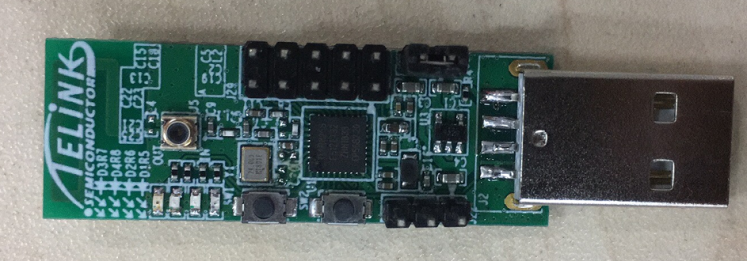
我们以TLSR8258平台为例。此demonstration至少需要2个TLSR8258 USB dongle,默认使用1M Flash。
平台差别
本文档以TLSR8258为例,与其他平台的区别如下:
1) TLSR8258平台Lighting节点上演示的灯是黄色的,其他平台是红色的;
2) GW设备的BLE广播名称:
-
TLSR8258和TLSR921x:tl--gw
-
TL321x和TL721x:multi--gw
3) Lighting设备的BLE广播名称:
-
TLSR8258和TLSR921x:tlBulb
-
TL321x和TL721x:multi--light
固件需求
1) concurrent_sampleGW_8258.bin:Zigbee/BLE双模Gateway(GW)
2) concurrent_sampleLight_8258.bin:Zigbee/BLE双模lighting设备(Lighting)
固件获取
SDK下载地址:
https://github.com/telink-semi/telink_zigbee_ble_concurrent_sdk/releases/tag/V2.4.1.0
https://gitee.com/telink-semi/telink_zigbee_ble_concurrent_sdk/releases/tag/V2.4.1.0
在目录下下载最新版本的SDK。
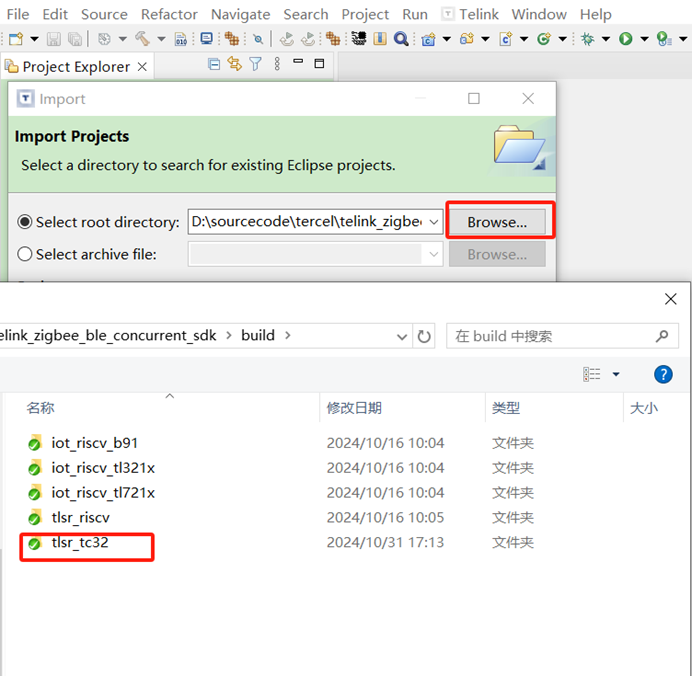
在集成开发环境导入TLSR8258工程,打开IDE,依次进入界面File->Import->Existing Projects into Workspace,在SDK的build目录下选中tlsr_tc32,如下图:
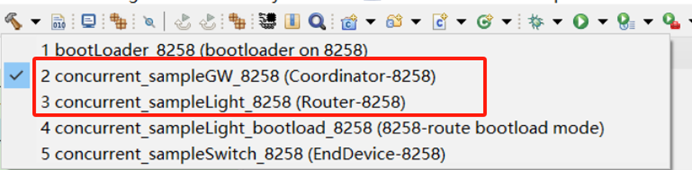
通过concurrent_sampleGW_8258编译选项产生concurrent_sampleGW_8258.bin。
通过concurrent_sampleLight_8258编译选项产生concurrent_sampleLight_8258.bin。
固件的编译、烧录方法参见文档“AN_18110500-E_Telink Zigbee Demo User Guide”第三章。
固件测试
建立网络(GW设备)
Step 1. 上电GW节点,红灯亮
Step 2. 手机端打开TelinkConnect,进入ADV界面,按左上角扫描按钮启动搜索蓝牙设备,可以发现名为tl--gw的BLE设备。
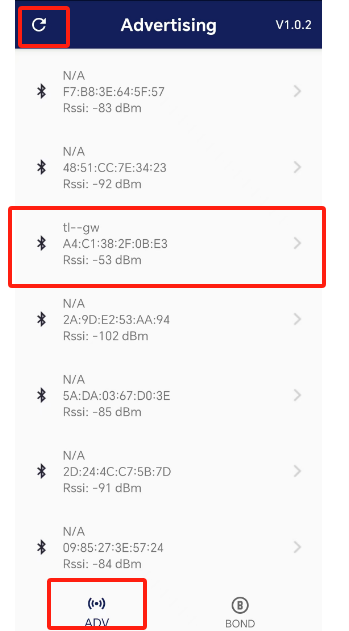
Step 3. 点击tl--gw,连接、绑定该设备
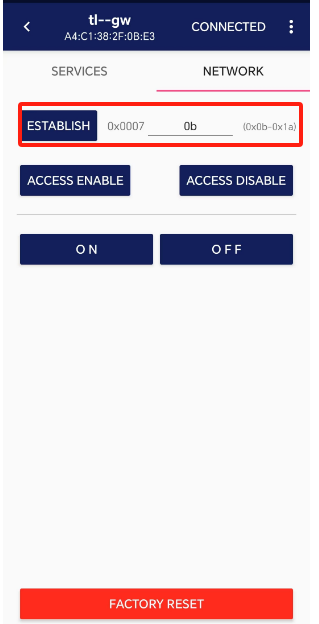
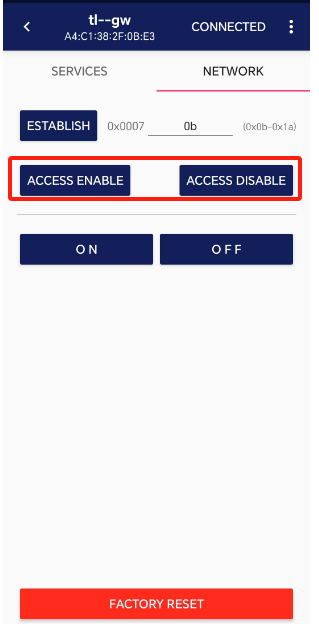
Step 4. 如下图,填入Zigbee的工作信道,点击ESTABLISH,在GW上创建Zigbee网络。如果已经建立网络,可如下面第二张图,打开或关闭Zigbee permit join。
接入网络(Lighting设备)
Step 1. 点击ACCESS ENABLE,使能GW的入网允许,GW dongle上绿灯亮
Step 2. 在GW入网允许条件下,给未入网的Lighting节点上电,Lighting节点会启动自动入网,入网成功后也会自动打开 permit join 180s, 相应绿灯变亮。
灯节点控制
双模灯节点的行为既可以由GW来控制,也可以由手机通过BLE使Lighting直接控制。
通过GW节点控制
有以下2种方式:
1) GW按键控制Light灯:
SW1按键短按,触发GW的Zigbee广播动作,GW每秒会广播一次On/Off命令,Lighting节点的黄灯会随之闪烁,再按一次会停止连续广播
2) 通过BLE使GW控制Light:
在TelinkConnect连接GW,进入下图界面
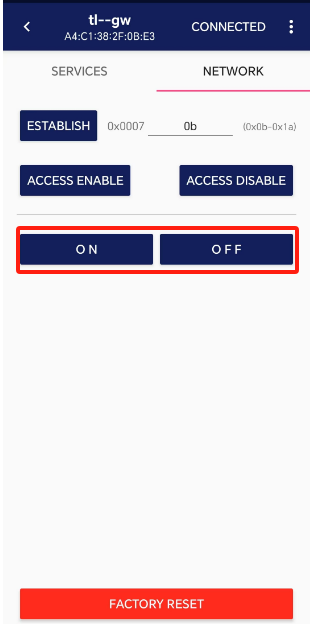
按键ON,TelinkConnect会向GW发送BLE消息,让GW广播Zigbee on指令,
按键OFF,TelinkConnect会向GW发送BLE消息,让GW广播Zigbee off指令。可以看到Light灯随之亮灭。
通过Lighting节点控制
Step 1. 通过TelinkConnect搜索,名为tlBulb的即为Lighting设备
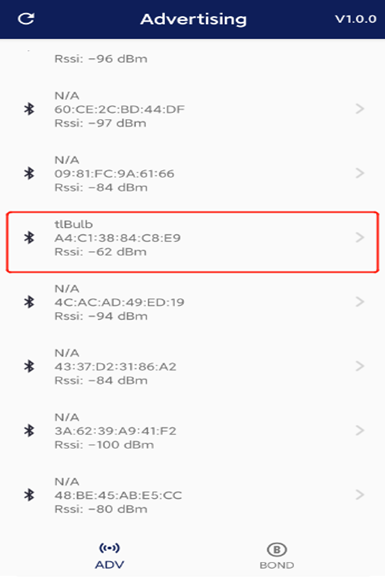
Step 2. 配对、连接该Lighting设备
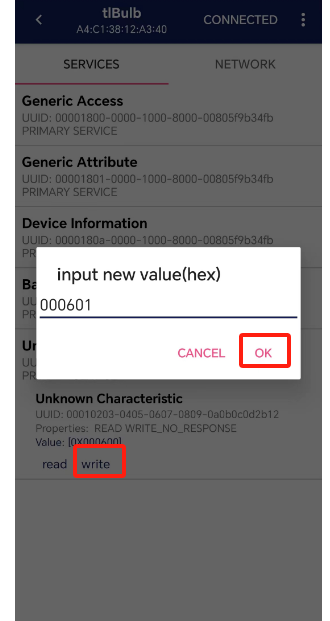
Step 3. 连接后,进入该设备操作界面,在命令界面下,直接发送开、关灯命令,可以看到Lighting上的黄灯随之亮灭。
-
开灯命令:0x000601
-
关灯命令:0x000600