Telink Channel Sounding Handover Solution Application Guide
Overview
This document applies to the preparation and construction of Telink Channel Sounding (CS for short) Handover Demonstration. The purpose of this document is to facilitate FAEs or customers to get the demonstration to quickly familiarize with it and build it for facilitating demonstration and evaluation.
Channel Sounding Handover Ranging Solution
The Telink Channel Sounding Handover solution is currently based on TLSR922x series chips for demonstration, which supports the hardware configuration of '1 master and multiple anchors', and can be applied to multiple scenarios, such as digital car keys, spatial positioning, etc. The CS Handover solution based on TL322X will be launched later, which will further optimise the ranging delay and improve the ranging stability on the existing solution.
Channel Sounding Technology Principle
Bluetooth Channel Sounding technology, as a core feature in the Bluetooth Core Specification 6.0, introduces an unprecedented level of security and precision in distance measurement for Bluetooth technology. This innovation not only significantly expands the application boundaries of Bluetooth, but also provides strong technical support for various use cases, including Bluetooth "Find My" service and digital key solutions.
Bluetooth Channel Sounding utilizes two mature ranging methods: Phase-Based Ranging (PBR) and Round-Trip Time (RTT), to achieve secure and precise distance measurements between Bluetooth-connected devices.
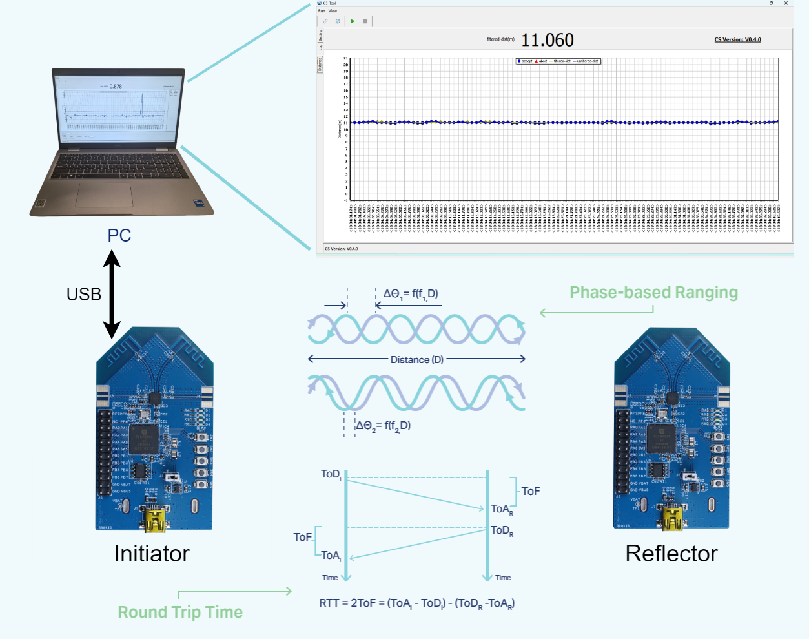
Principle of Phase-Based Ranging (PBR)
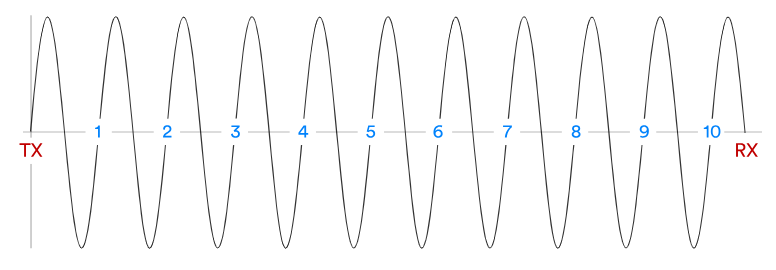
According to communication principles, the distance of signal propagation can be determined by the number of signal cycles. As shown in the figure above, assume the signal propagates at a fixed frequency f, with a propagation speed equal to the speed of light c, and the signal wavelength is \(\lambda\). If the signal propagates N cycles, the propagation distance can be expressed as:
However, devices typically cannot directly measure the number of signal cycles between the transmitting and receiving devices. Therefore, PBR involves a technology that estimates the distance between devices using other data. The working principle of PBR is as follows:

(1) Device A sends a signal at a fixed frequency f~1~. For simplicity, the initial phase of the signal transmitted by device A is set to 0.
(2) Device B receives the signal and records the received phase as \(\varphi\)~1~。
(3) Device B then retransmits the signal back to device A at the same frequency f~1~, ensuring that the initial phase of the retransmitted signal is \(\varphi\)~1~. This ensures that the received signal at device A is a continuation of the signal it originally transmitted, both in phase and frequency.
(4) Device A measures the phase of the received signal, denoted as \(\Delta\)\(\varphi\)~1~, which represents the phase difference of the signal that has propagated between device A and device B.
Device A repeats the above steps at a fixed frequency f~2~, and records the phase difference of the received signal as \(\Delta\)\(\varphi\)~2~.
The distance between device A and device B can be expressed as:
Principle of Round-Trip Time (RTT)

The principle of RTT-based ranging is relatively simple. As shown in the diagram, assume that device A sends a signal at time ToD~A~, and device B receives the signal at time ToA~B~. After a period of time, device B retransmits the signal at time ToD~B~, and device A receives it at time ToA~A~. The Time of Flight (ToF) is the time it takes for the signal to propagate between device A and device B.
The times ToD~A~ and ToA~A~ are known to device A, and similarly, ToA~B~ and ToD~B~ are known to device B. Therefore, the ToF can be calculated as:
Assuming the signal propagation speed is the speed of light c, the distance R between device A and device B can be expressed as:
Channel Sounding Handover Ranging Solution Principle
(1) The master node connects with the phone or Fob via BLE, and obtains the ACL connection information of the phone or Fob;
(2) The master node transmits the connection information to all the sub nodes through the bus method;
(3) Each sub node listens to the ACL packet sent by the phone or Fob and feedbacks the received RSSI to the master node and then the master node summarises and outputs it;
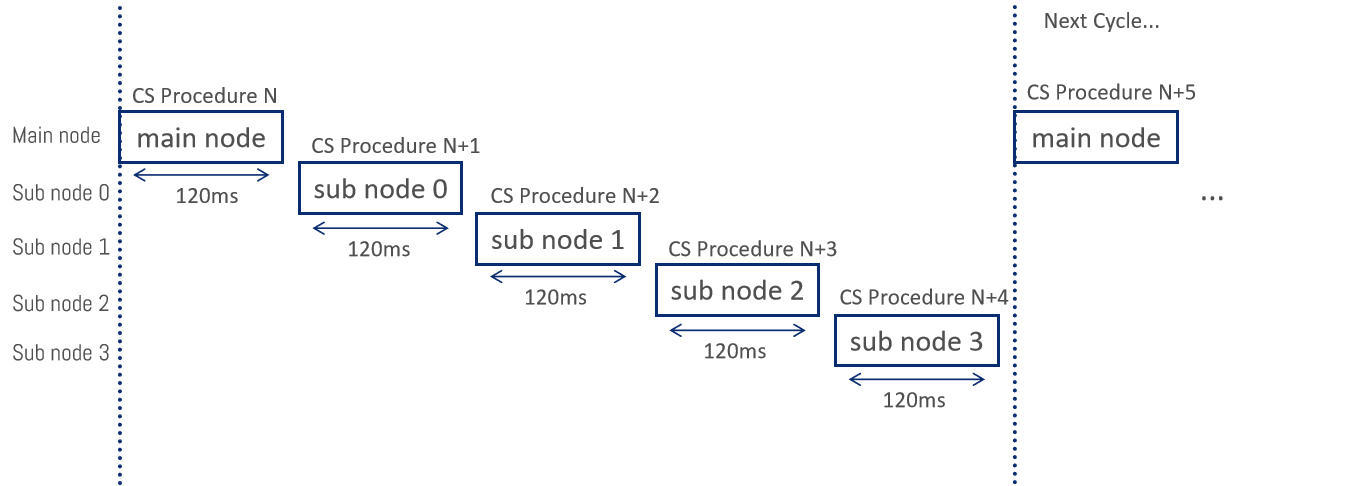
(4) The master node first starts the CS ranging process, and then sub node 1 performs CS ranging with the phone, after which each sub node performs CS ranging with the phone in turn;
(5) The ranging calculation of each sub node is completed independently, and the calculated distance information is output to the master node, and then the master node summarises and outputs it;
(6) In the current scheme based on TLSR922X series, the time of inter-node ranging cycle is 120ms, and in the configuration of “1 master and 4 anchors”, it takes 600ms to complete the one-round ranging.
Hardware and Software
Hardware and Software Preparation
(1) Development boards: C1T325A102_V1_0 & C1T266A102_V1_0
(2) Vehicle End Nodes_Bin:
- Main node: sniffer_main_node_2025-4-16(USB-CDC).bin
- Sub nodes: sniffer_sub_node_2025-4-16.bin
(3) Fob node_Bin: sniffer_fob_node_2025-4-16(dual-antenna).bin
(4) Host computer software: Telink BDT_CS_Tool
(5) Others:
- 12V power supply
- CAN twisted pair cable
- Mini-USB cable
Hardware Introduction
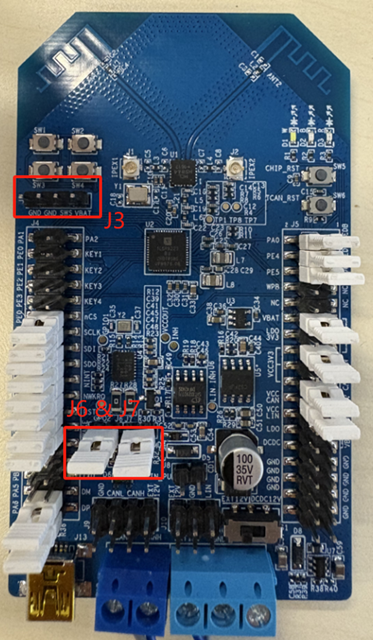
(1) Main node & sub nodes hardware: TLSR9223B_C1T325A102_V1_0
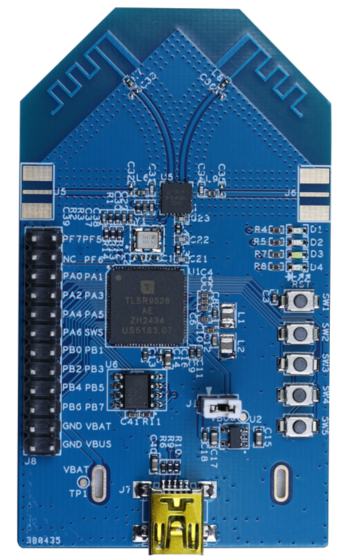
(2) Fob node hardware: TLSR9528A_C1T266A102_V1_0
(3) LED indicator status:
-
Main node:
- White light: 400ms cycle blinking
- Red light: always on indicates ACL connection
- Blue light: blinking indicates that RF is in the state of sending packets
-
Sub nodes:
- White light: 4 sub nodes in order of 1s/2s/3s/4s cycle blinking respectively
- Red light: always on indicates successful listening
- Blue light: blinking indicates that CS is in progress
-
Fob node:
- Green light: 2s cycle blinking
- Red light: always on indicates ACL connection
Master-Slave Nodes Hardware Connection Architecture
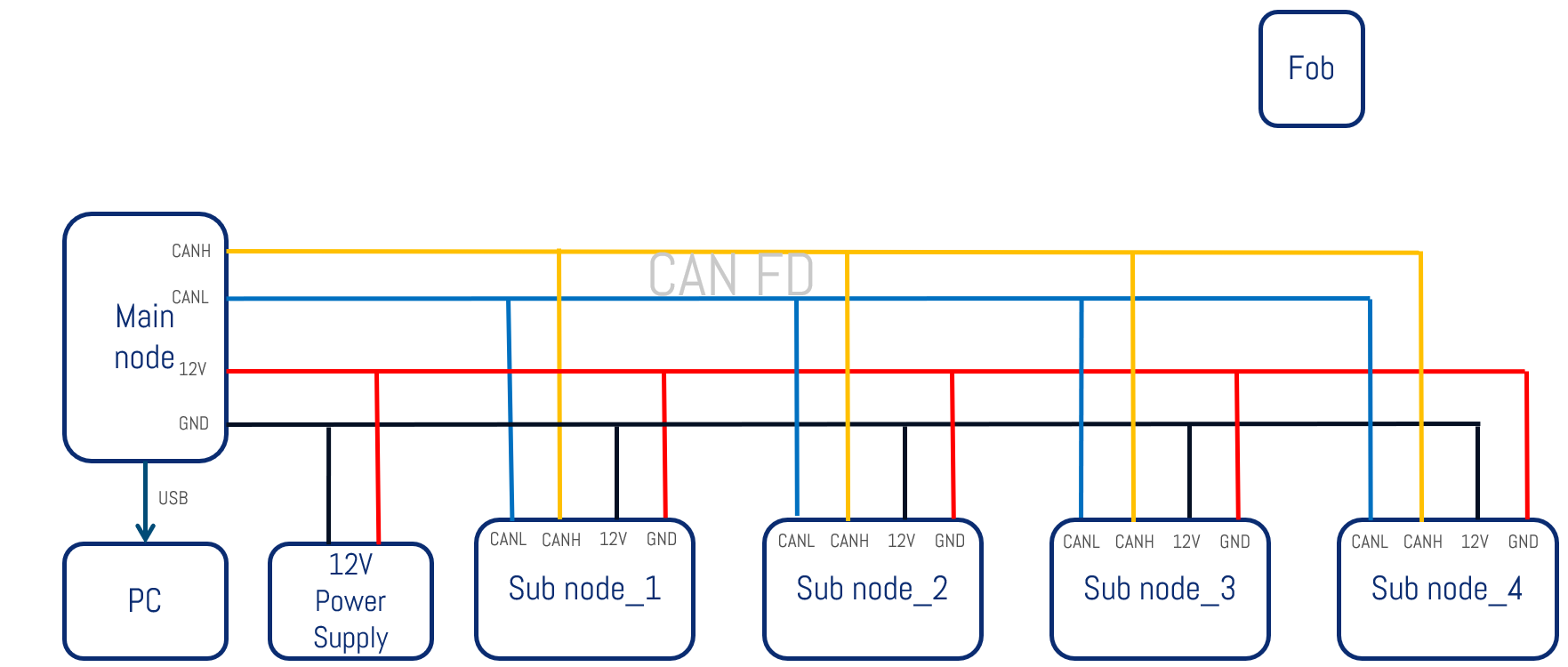
(1) CANH/CANL/12V/GND
(2) Note that the CAN bus needs to use twisted pair cable to connect.
Operation Steps
Software Burning Method
Software Burning Connection
(1) Host computer software: Telink BDT
(2) Tool: BEVK (the black box device in the picture below)
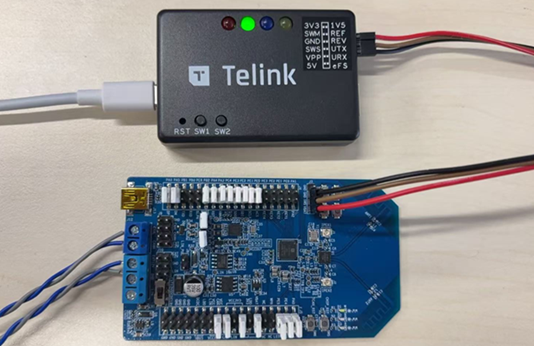
(3) Hardware Connection
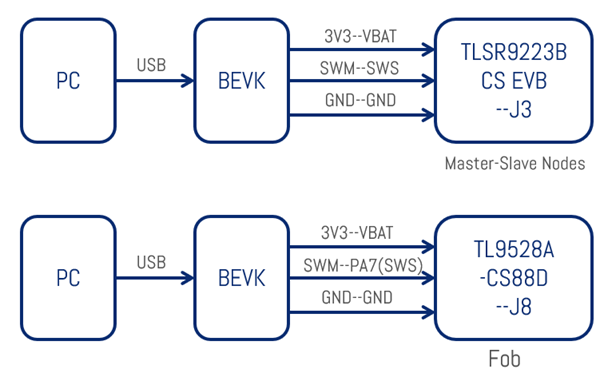
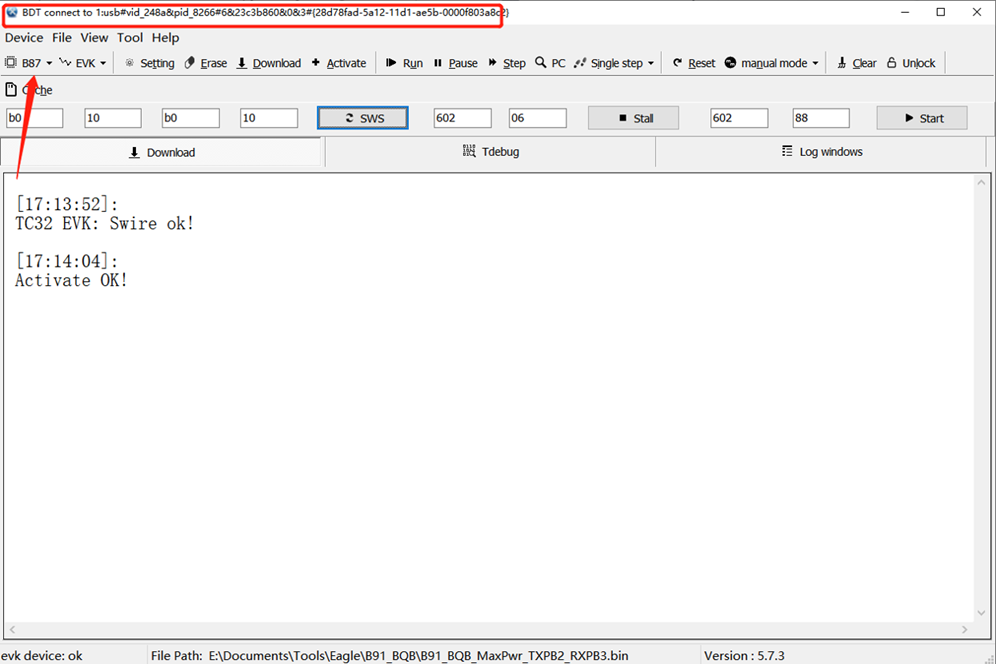
If the hardware connection is successful, the following red box will appear, prompting "BDT connect to 1: usb#vid_248a&pid_8266 ......".
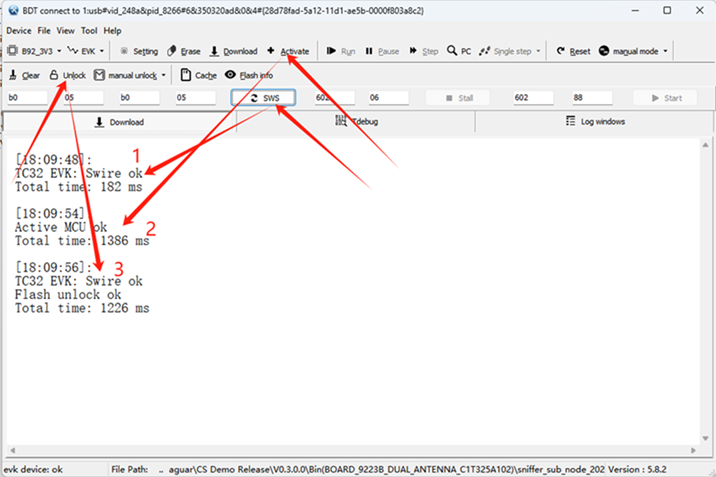
Software Burning Steps
Select B92_3V3 for chip type.
Burning preparation:
Step 1: Click SWS, it will prompt "Swire ok", which means the connection with the chip is OK;
Step 2: Click Activate, it will prompt "Activate MCU ok!", at this time the chip can be stopped running;
Step 3: Click Unlock, it will prompt "Flash unlock ok", at this time, the flash is unlocked successfully, you can start the software burning.
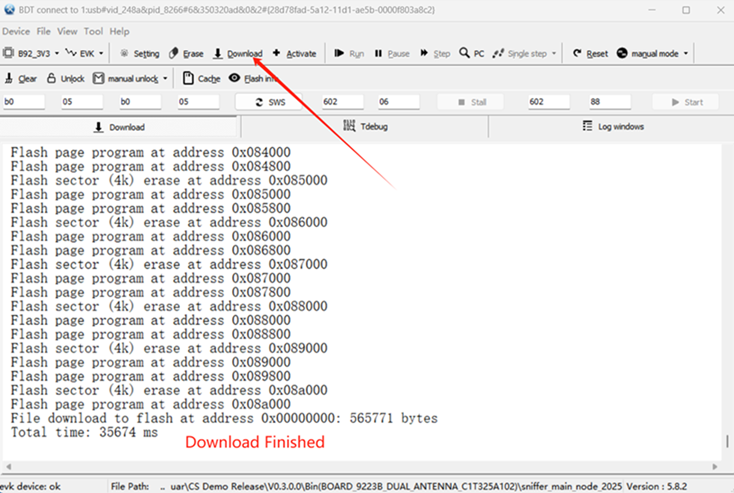
Software Burning:
(1) Click "File" to select the bin file that needs to be burned;

(2) Click "Download" to burn, and wait for it to finish.
- For main node, choose bin: sniffer_main_node_2025-4-16(USB-CDC).bin
- For sub node, choose bin: sniffer_sub_node_2025-4-16.bin
- For fob, choose bin: sniffer_fob_node_2025-4-16(dual-antenna).bin
Burn Different Flash Configurations for Each Node
As shown in the following figure, click "Tool", select "Memory Access", and set each option according to the following figure: B92_3V3/EVK/FLASH/len: 16 Bytes.
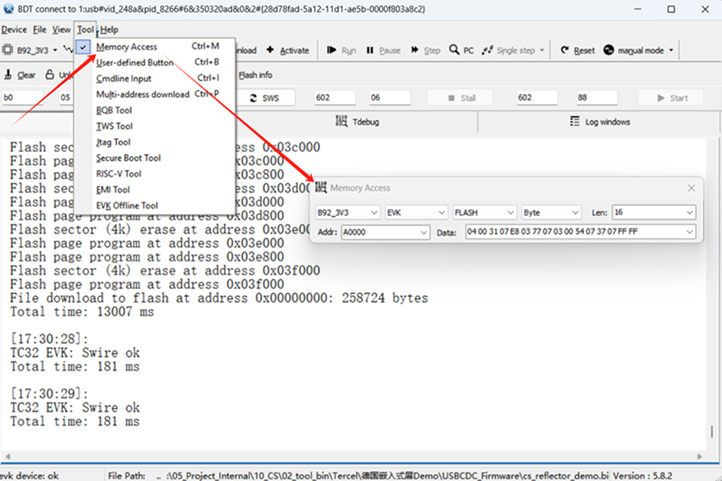
For the CS parameter and transmit power parameter configuration, currently the master and slave nodes use the software default configuration, it is necessary to ensure that no other parameters exist in the 4KB region of Flash address 0x0A1000.
The method of erasing 4KB Flash:
Step 1: Click "Setting" button;
Step 2: Set Erase Flash Addr(H): A1000;
Step 3: Set Sector Start Size(K): 4;
Step 4: Click "Erase" button, the log of the operation can be seen, at this time the 4K erase is completed.
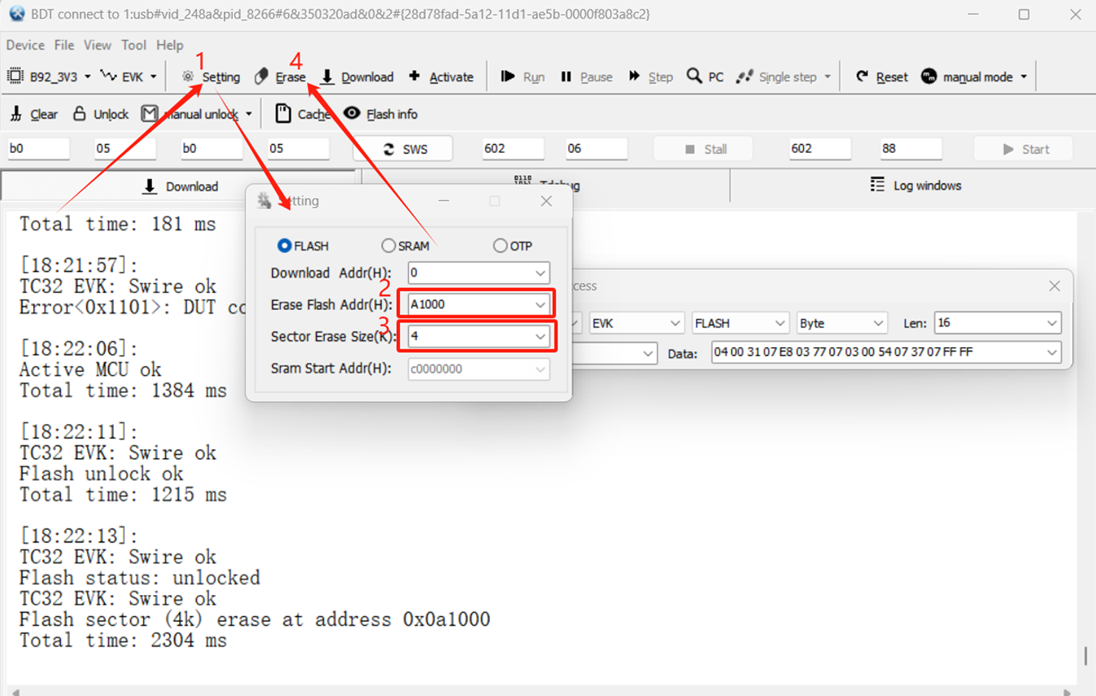
Steps to burn different Flash configurations for each node:
(1) First it is necessary to perform a 4K erase for 0x0A0000:
Follow the Erasing 4KB Flash method to erase the Flash 4K with the address set to A0000:
Step 1: Click "Setting" button;
Step 2: Set Erase Flash Addr(H): A0000;
Step 3: Set Sector Start Size(K): 4;
Step 4: Click "Erase" button, the log of the operation can be seen, at this time the 4K erase is completed.
(2) Node configuration: Used to configure the node sequence and CAN bus parameters, etc. Flash address is set to 0x0A0000, Data content is set ID according to the different nodes, and Flash writing can be completed by pressing Enter in the Data input box area:
- Main node and sub node 1: 04 00 31 07 64 00 77 07 00 00 51 07 37 07 FF FF

- Sub node 2: 04 00 31 07 64 00 77 07 01 00 52 07 37 07 FF FF

- Sub node 3: 04 00 31 07 64 00 77 07 02 00 53 07 37 07 FF FF

- Sub node 4: 04 00 31 07 64 00 77 07 03 00 54 07 37 07 FF FF

Note
- For 1-to-3 demonstration nodes, it is necessary to change 04 00 31 ... respectively to 03 00 31 ... and burn them respectively.
Burn cali_tone parameters Flash configuration for each node:
(1) Main node and 4 sub nodes: used to burn calibration parameters, Flash address is set to 0xFE300, press Enter in the Data input box area to finish Flash writing:
7F 36 9E 80 3F 0 3F 0 21 FE 20 F7 21 F8 22 1 22 4 23 FE 22 F7 24 FD 24 FF 23 F3 25 FA 26 FE 27 2 27 F9 27 F7 28 FA 29 FB 29 F8 29 F6 2A FA 2B FA 3F 0 3F 0 3F 0 2D FA 2E FC 2E FA 2E F3 30 FA 30 FC 31 FA 32 F9 32 F6 33 F9 35 FF 36 F9 36 F5 38 FD 38 2 38 F4 38 F6 39 2 3A 7 3A 4 3A F7 3B 1 3C 3 3C FE 3D 4 3D 5 3D 3 3E F9 3D B 3E 7 3F 4 3F B 3F FE 3D 10 3E C 3C 10 3C 10 3D 10 3B 14 3D 8 3C 11 3D D 3C F 3C E 3B 10 3A 11 3B C 3A F 3B C 3B C 37 18 3F 0 3F 0

(2) Fob node: used to burn calibration parameters, Flash address is set to 0x1FE300, press enter in the Data input box area to complete the Flash write:
4A 35 9E 80 3F 0 3F 0 20 B 20 A 21 8 20 C 1F 10 21 D 22 9 22 C 24 5 23 9 24 9 24 8 25 6 25 4 25 8 26 5 26 6 27 2 27 1 27 6 27 7 3F 0 3F 0 3F 0 29 6 2A 1 2A 4 2A 2 2A 9 2B FF 2B 0 2C FF 2C 0 2C 3 2C FF 2D FE 2D FC 2E 2 2D F6 2E F9 2E FB 2F FF 2F 4 2F FF 30 FD 30 FE 31 FF 31 F6 31 F9 31 F7 33 0 32 F3 33 F9 34 F7 35 F9 35 F9 34 F2 37 FE 37 F6 38 FE 39 FB 39 FA 3A FB 39 F5 3A 0 39 F0 3A F3 3A EF 3B F4 3A ED 3C F3 3D F4 3C EE 3F FA 3B E8 3F 0 3F 0
After burning the different configurations, the software burning session is complete and the next step will be to build and test the connection environment.
Connection and Testing
Connection
Connect the master and slave nodes according to the following connection methods respectively:
(1) Master and slave nodes communicate directly through the CAN bus, the two nodes at the far ends of the bus (main node and sub node 1) need to connect the two jumpers J6 & J7 respectively for enabling the terminal resistor;
(2) The master and slave nodes are supplied with 12V power, and the Fob end can be powered by the USB port through a power bank;
(3) The main node is directly connected to the computer via a mini-USB cable, and the distance data and log are displayed through the host computer software on the computer side;
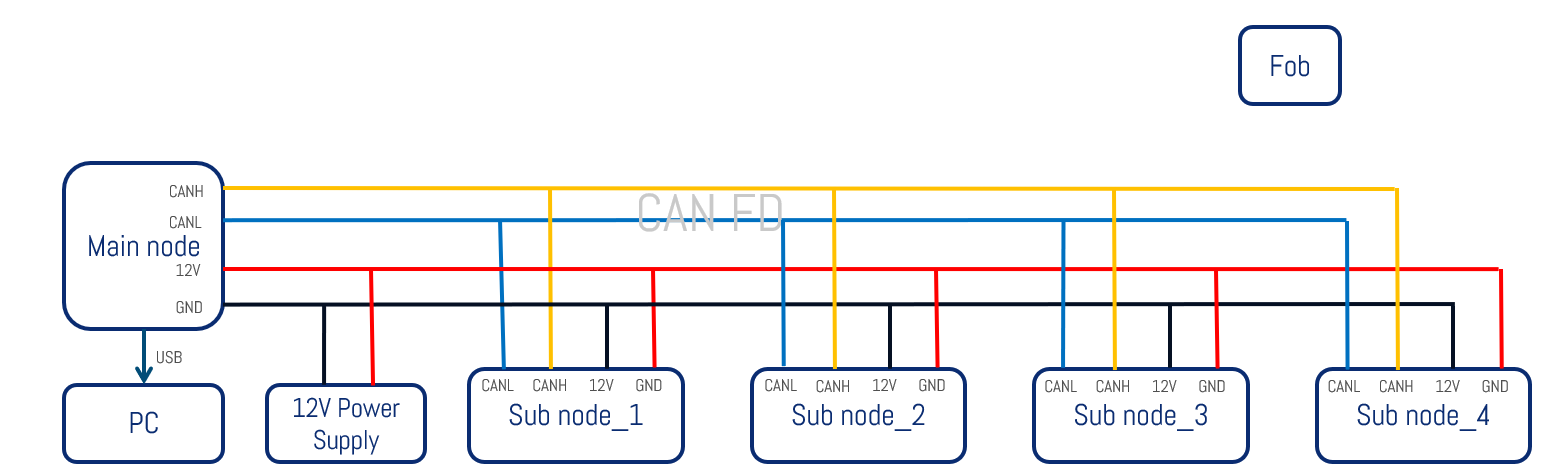
After following the above steps to connect the hardware, open Telink BDT_CS_Tool on the computer side:
(1) Open Telink BDT;
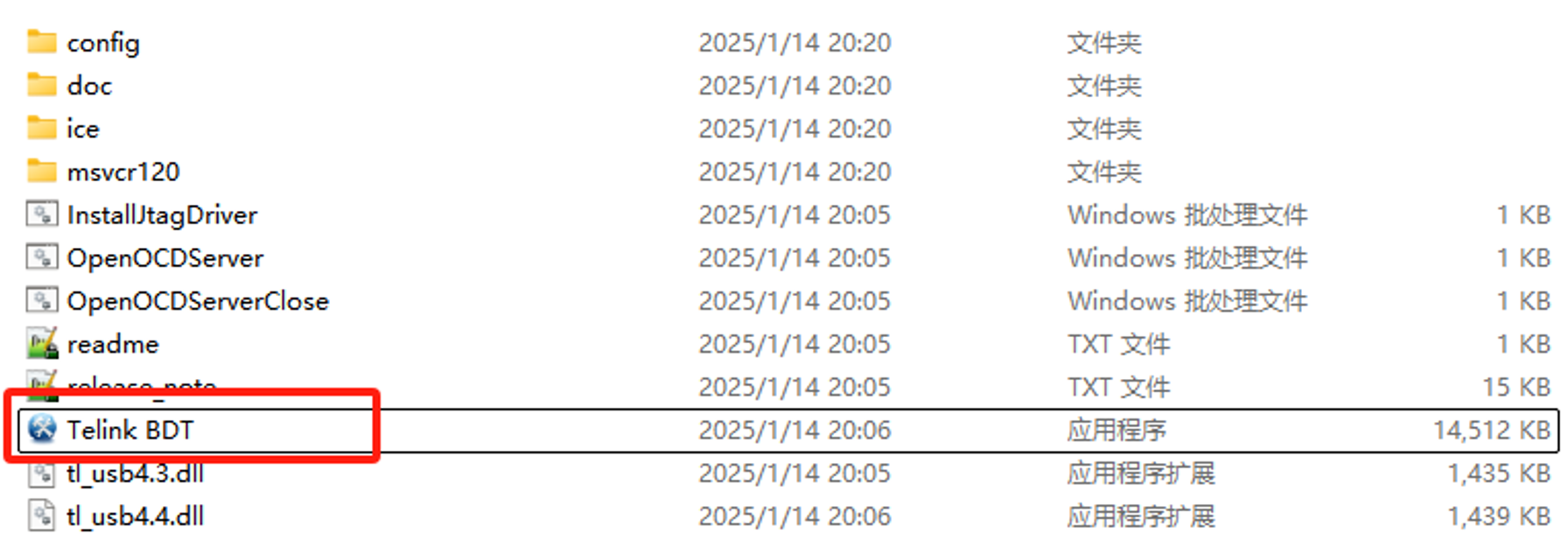
(2) Click the "Tool" button and select "CS Tool";
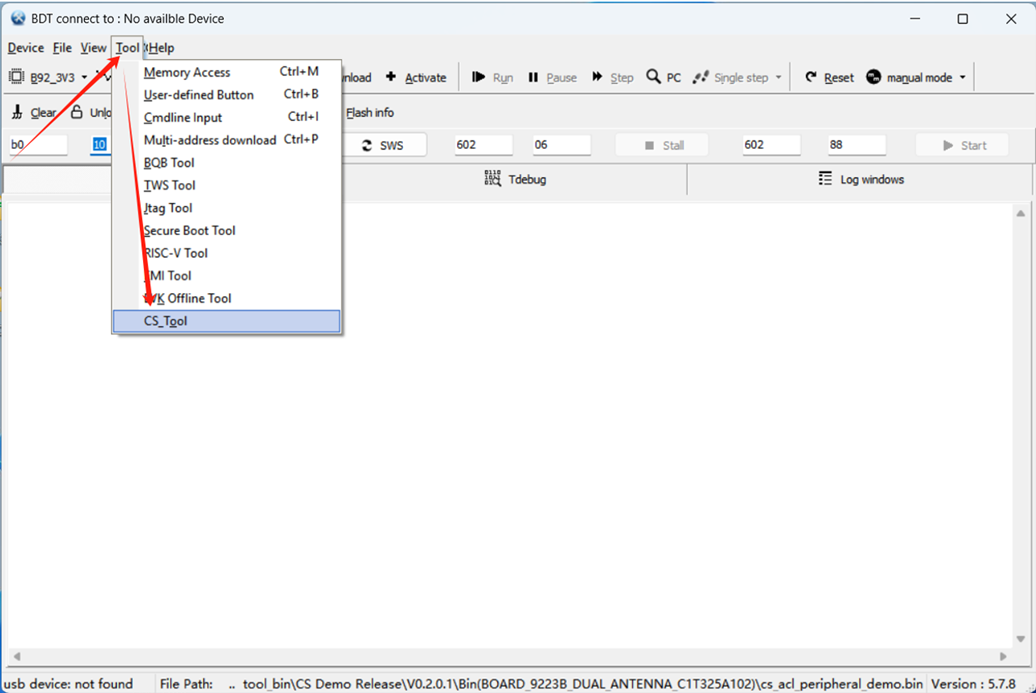
(3) The CS Tool pops up as shown below:
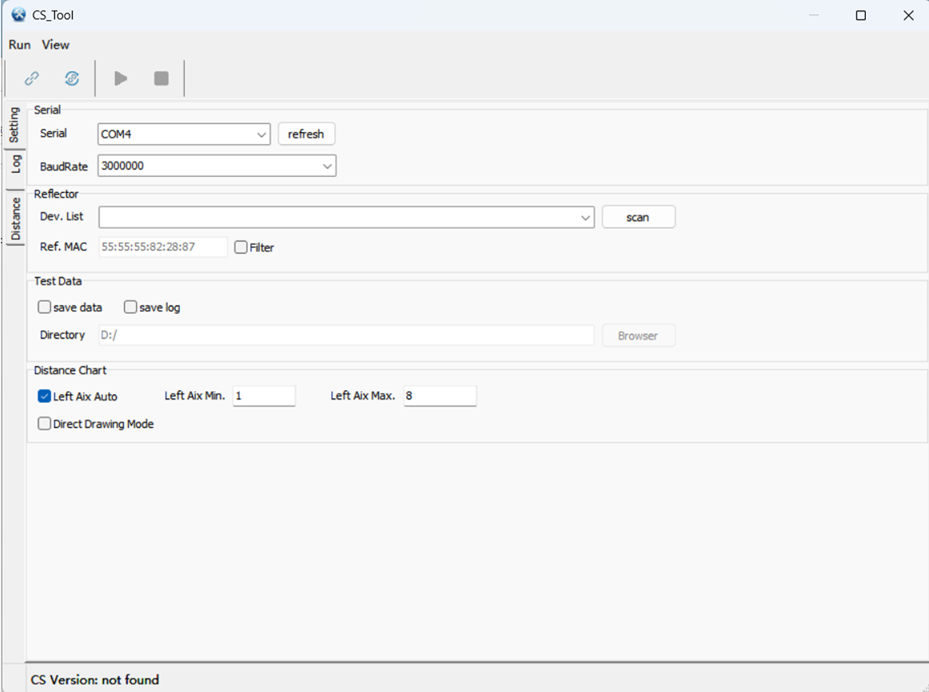
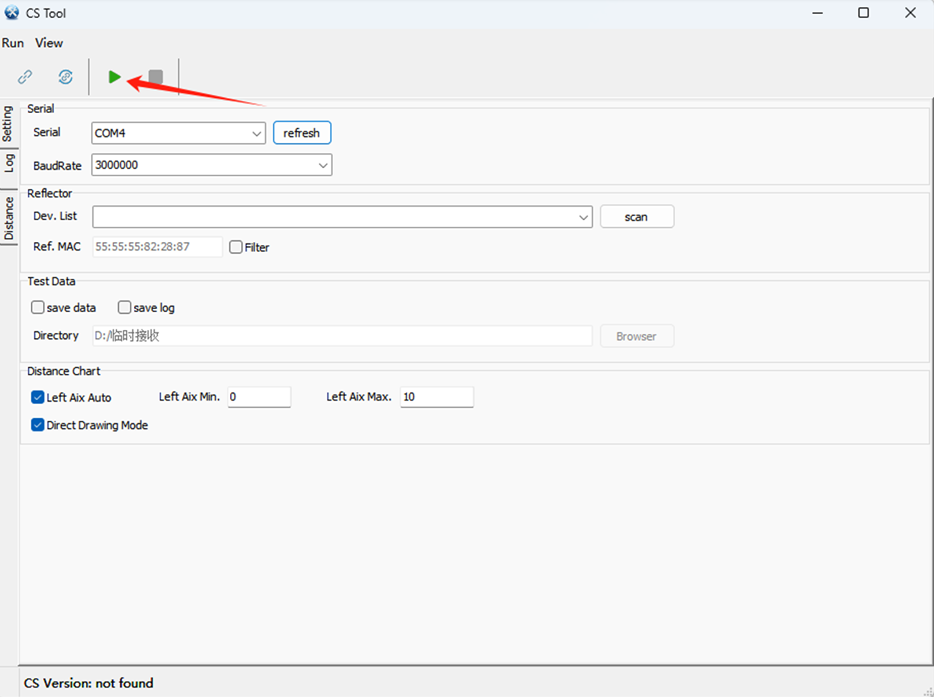
For devices that have been connected and paired, you can directly click the green triangle button to start the test.
Note
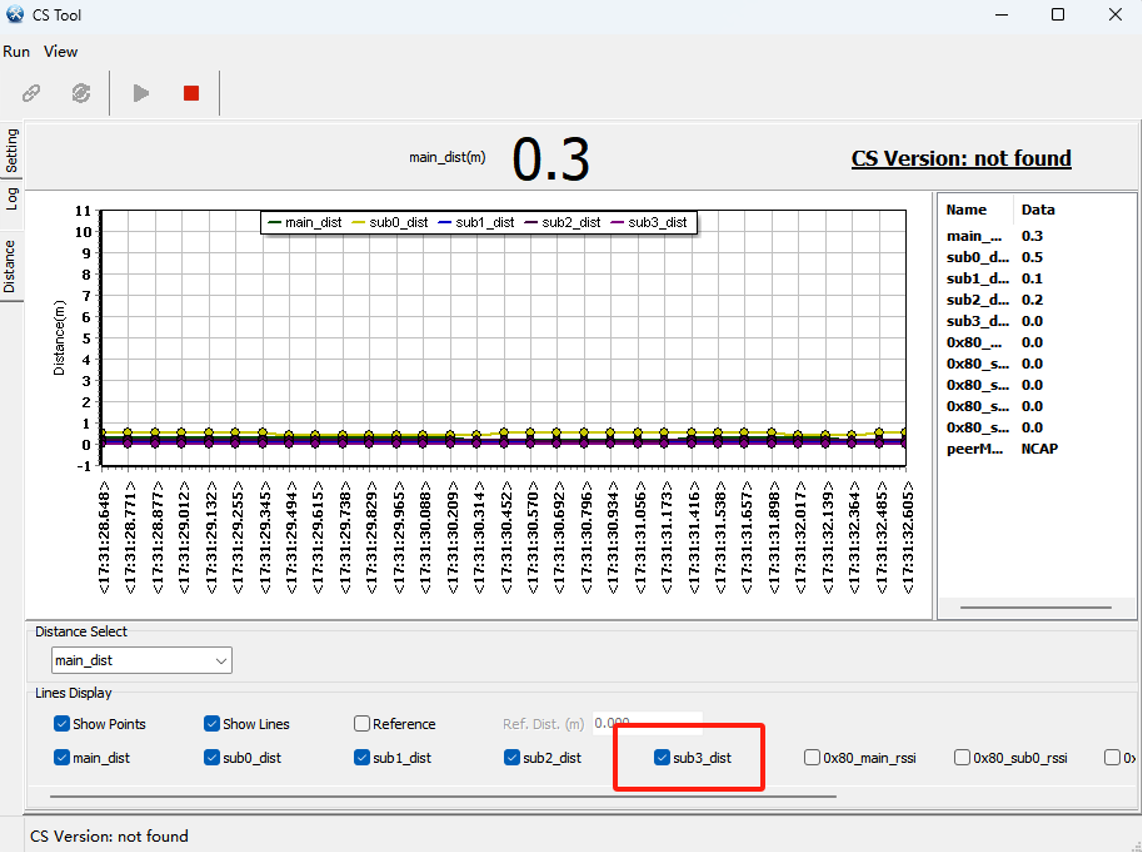
- For 1-to-3 demonstration, it is necessary to uncheck the red box sub3_dist below.
For devices paired for the first time, follow the steps below to continue the operation and start the test:
(1) Select the corresponding serial port number, and select the communication baud rate of 3000000;
(2) Click "scan" to scan the device, be careful not to check the MAC Filter option below;
(3) In the list of scanned devices, select the device named "cs_telink";
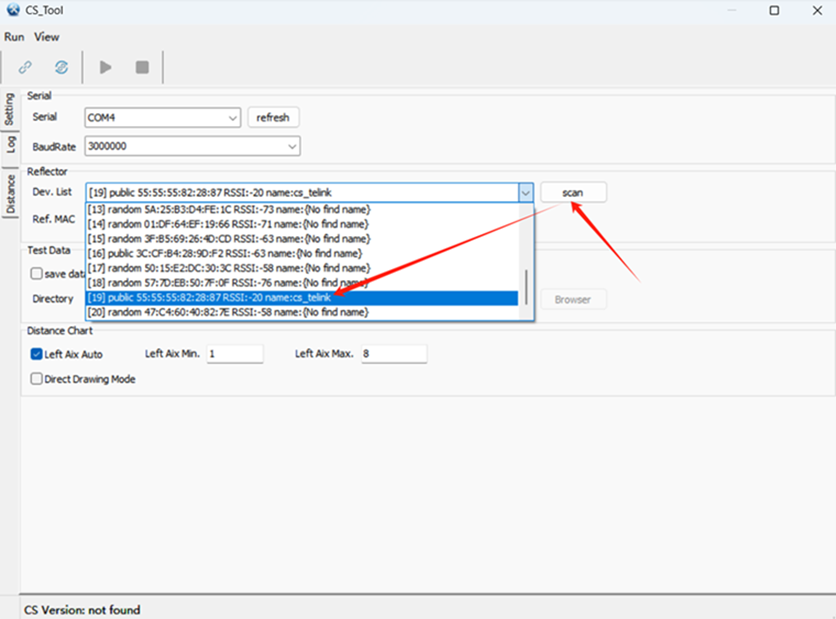
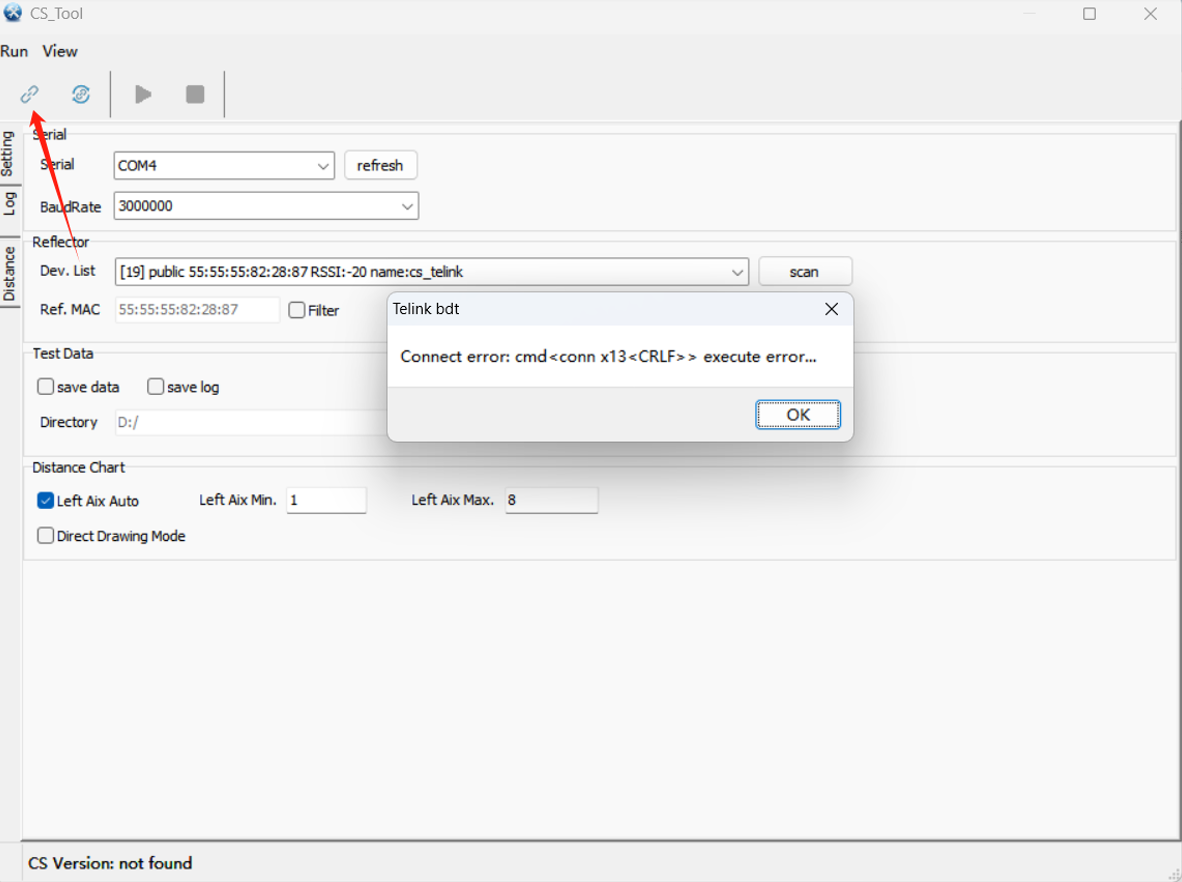
(4) Click the "Connect" button in the upper-left corner (for the time being, ignore the pop-up box of error, click ok to turn it off), the red LEDs of the master and slave nodes will be always on after the connection is successful;
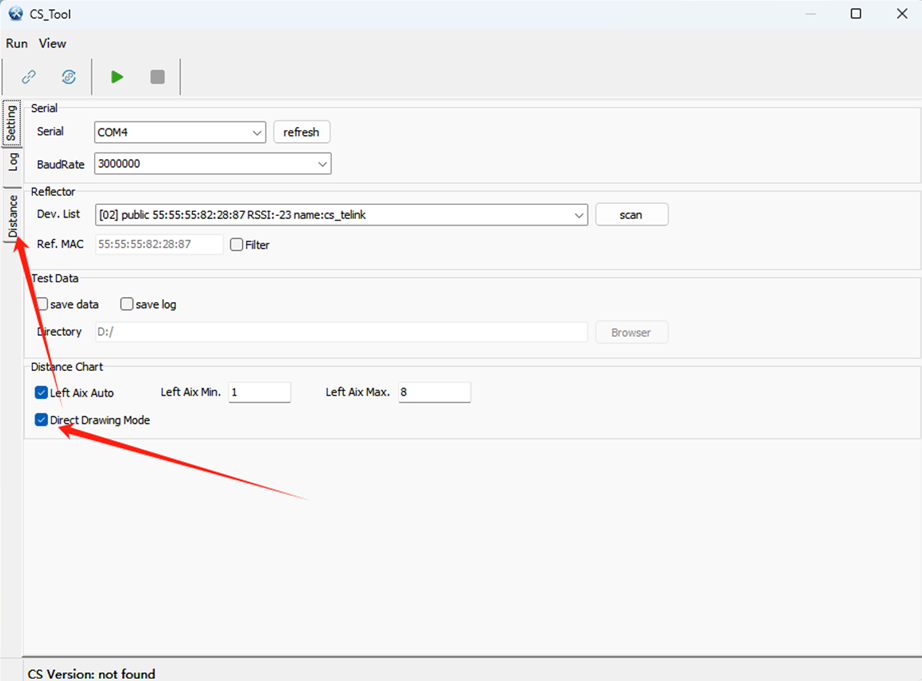
(5) Check "Direct Drawing Mode". Click Distance to switch to the chart interface;
(6) Click the "View" button on the top, check "Chart Setting", and in the Lines Display interface that pops up at the bottom, check the options as shown in the figure, and make sure that "Main Dist", "sub0_Dist", "sub1_Dist", "sub2_Dist", "sub3_Dist " are checked;
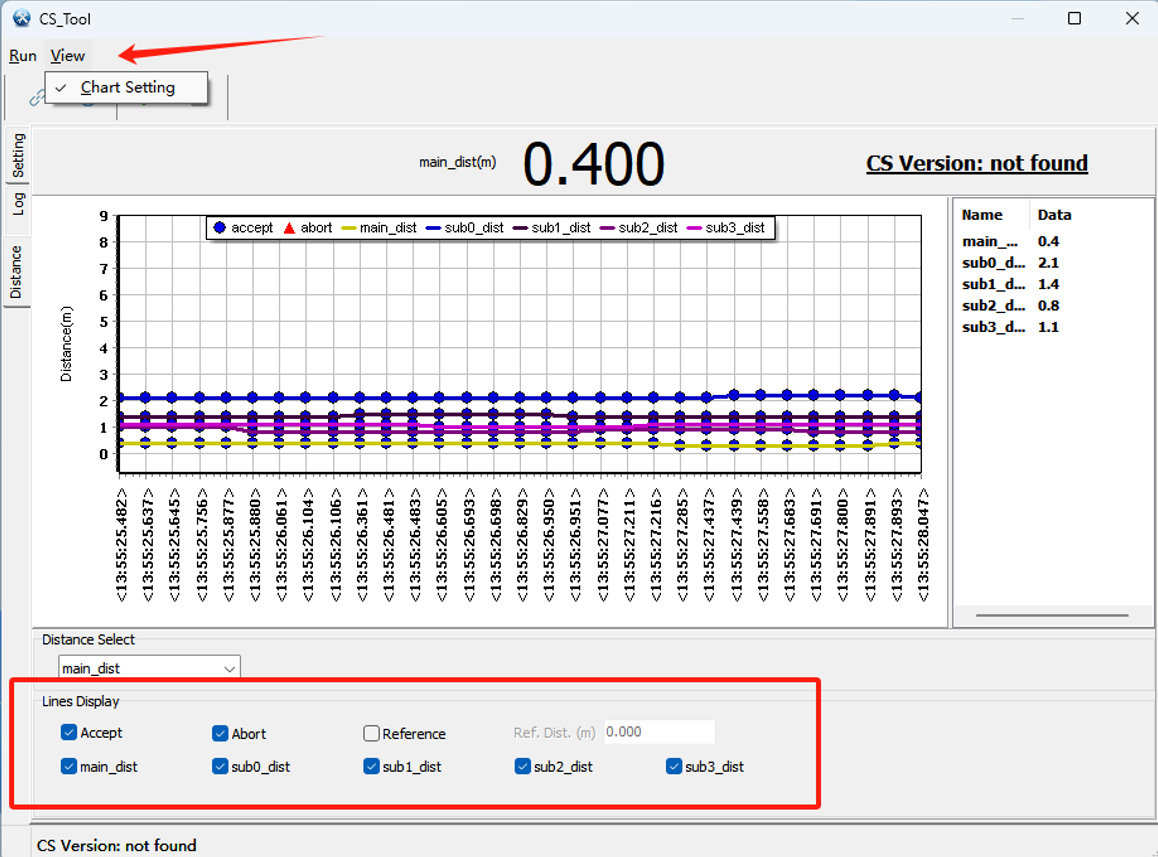
(7) Click the "Start" button and observe that the graph starts to refresh and display the measured distance values;
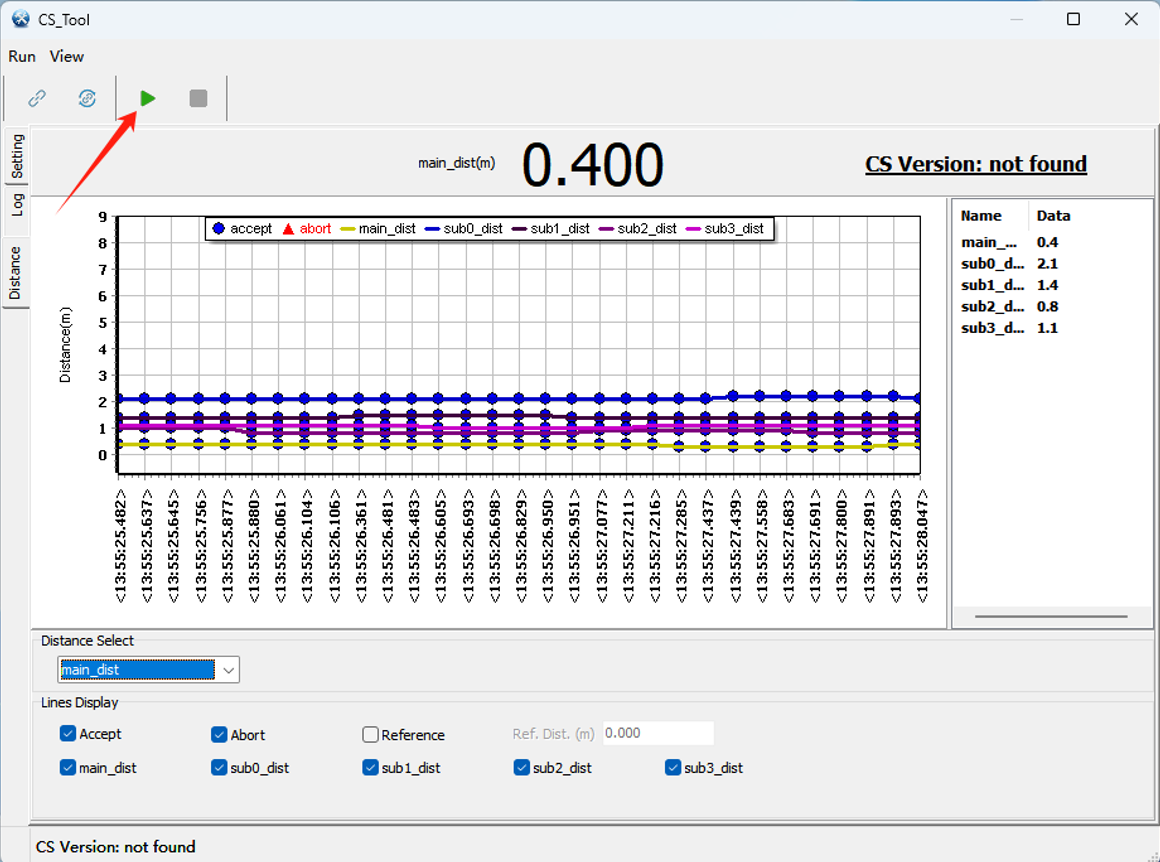
(8) In addition, the output raw log can be seen by switching to the "log" tab, and you can set to save the log in the "Setting" tab interface;

Next test and evaluate can be performed according to different test scenarios.
Test Scenarios
Test Purpose: To evaluate Handover multi-node ranging stability and dynamic test response under real vehicle conditions;
Test environment and methods:
-
In the outdoor parking lot environment, fix the Initiator master node, place it in the centre console position of the real vehicle and connect to the computer via a USB cable;
-
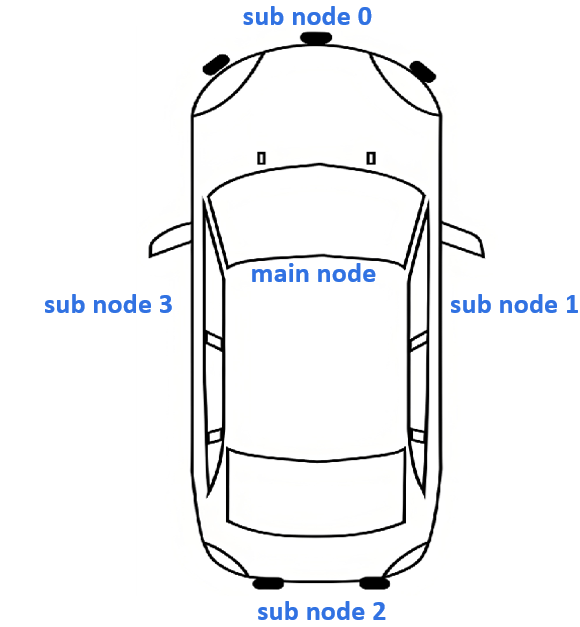
Nodes location layout:
- Main node: placed in the centre console armrest box.
- Sub node 0: placed in the front bumper of the car
- Sub node 1: placed on the passenger seat door handle
- Sub node 2: placed in the rear of the car bumper
- Sub node 3: placed on the driver's seat door handle
Case1:
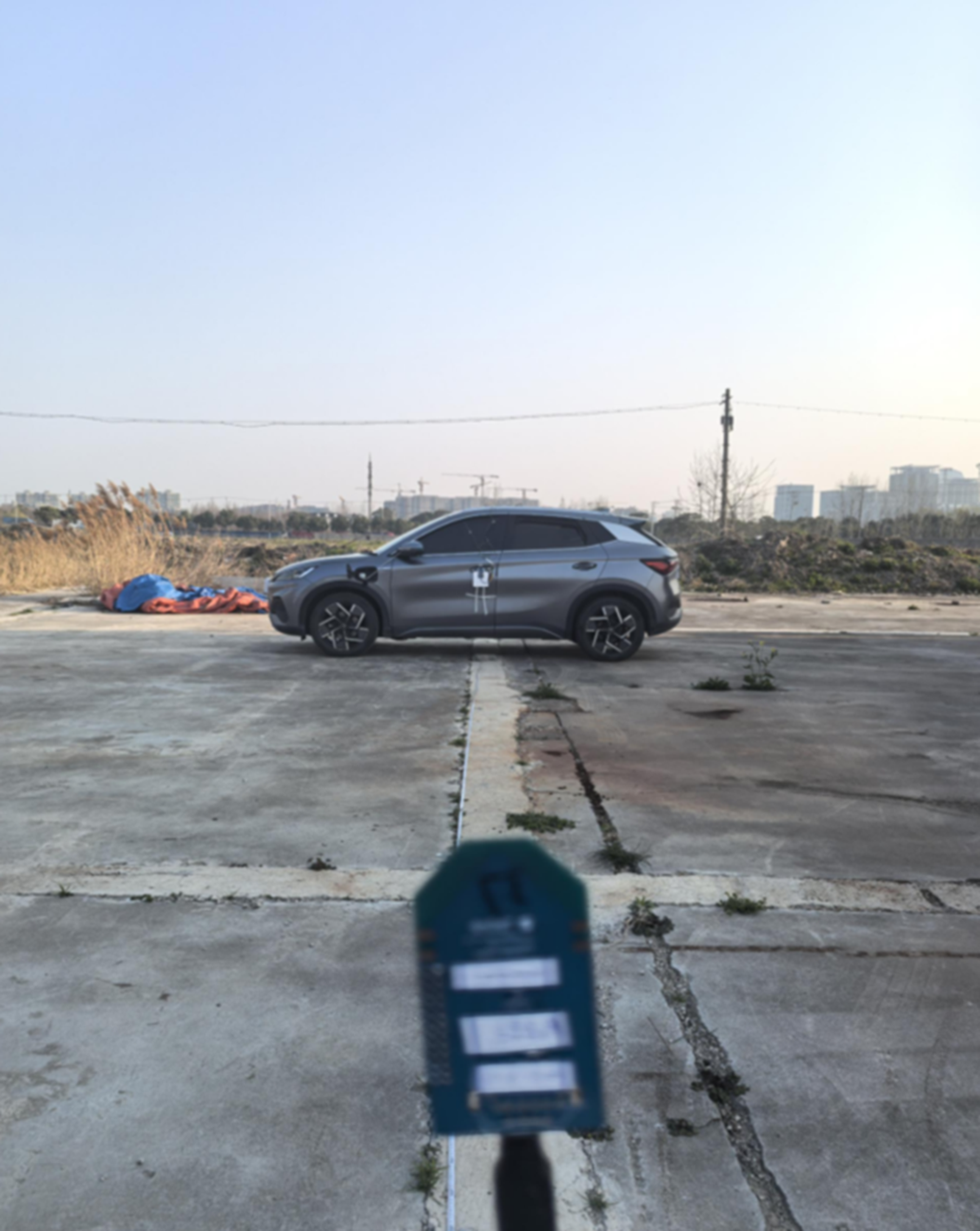
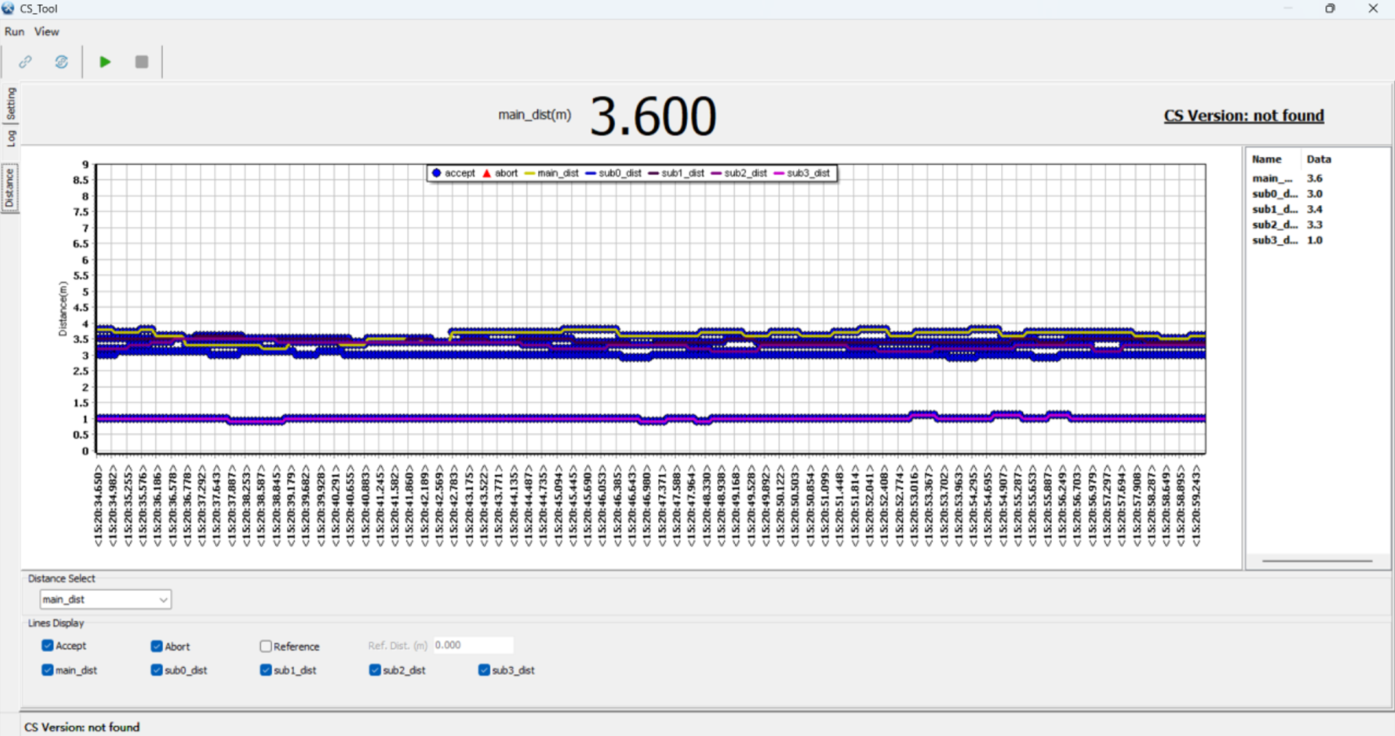
For the fixed point test in the direction of the driver's seat, test about 2 minutes for different distances and record the data;


Test Summary:
(1) The test error of the unshaded driver's seat node (node3) is relatively small, which is less than 0.5m;
(2) The centre console master node's fixing test error is around 2.5m to 3m, though the Offset is more consistent for different distances, and this deviation can be removed by calibrating the whole vehicle;
Case2:
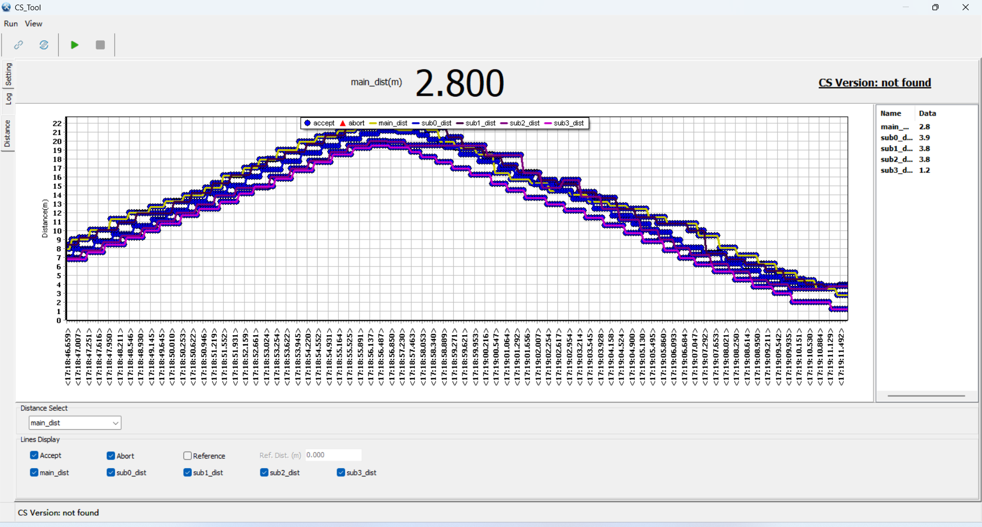
For the dynamic test in the direction of the driver's seat, users hold the Fob node, move away from the car to 20 metres and then return, record the round trip movement data and curve trend.
Test Purpose: Evaluate the accuracy and stability of the distance measured while moving dynamically, as well as the trend of the distance, etc.
Test Summary: The overall trend is shown in the figure, and the overall trend is in line with the driving route.