tl_matter SDK Getting Started
Overview
About this document
This document helps you quickly set up the tl_matter SDK development environment on Ubuntu, obtain the SDK, build an example, flash the firmware, and run your first Matter example.
Applicable scope
This document applies to Matter application development on Telink RISC-V SoC platforms. For detailed information about supported chip series, development boards, development platforms, toolchains, and SDK versions, refer to the latest Release Notes.
Note
- Open the Release Notes page and select the version corresponding to your current SDK version from the list on the left.
SDK dependencies
The tl_matter SDK depends on the tl_zephyr SDK and must be used together with it:
| Component | Purpose | Required |
|---|---|---|
| tl_zephyr SDK | Provides the Zephyr RTOS kernel, Telink HAL, BLE protocol stack, MCUboot, OpenThread, West, and the build toolchain | ✅ |
| tl_matter SDK | Provides the Matter protocol stack and Telink examples; uses the tl_zephyr SDK through TELINK_ZEPHYR_BASE | ✅ |
Both SDKs are required — the tl_matter SDK cannot be built independently of the tl_zephyr SDK, and the tl_zephyr SDK alone does not provide Matter protocol support.
Version compatibility:
Each tl_matter SDK release is validated against a specific tl_zephyr SDK version. A mismatched tl_zephyr SDK version may cause build failures or runtime exceptions. Refer to the Updates/Dependencies section of the Release Notes for the corresponding version compatibility information.
Development workflow
1. Prepare the hardware and software
2. Set up the tl_zephyr SDK environment
3. Get the tl_matter SDK source code
4. Initialize the build environment
5. Build and flash the Matter example
6. Verify the result
Preparation
Hardware checklist
| Hardware | Description |
|---|---|
| PC | Ubuntu 24.04 LTS (recommended) |
| Development board | Select a suitable development board according to the Release Notes |
| Programmer | Telink programmer |
| USB cable | Connects the PC and the programmer |
| Dupont wire | Connects the programmer and the development board |
Software checklist
| Software | Description |
|---|---|
| Programmer software | Telink BDT (Burning and Debugging Tool) for Linux, used for firmware flashing and debugging |
| Toolchain | riscv64-zephyr-elf, used to build Matter firmware |
| tl_zephyr SDK | Provides low-level drivers and system support |
| tl_matter SDK | Used to develop smart home devices that comply with the Matter standard |
Set up the development environment
Telink Matter examples are built with west build and depend on the tl_zephyr SDK.
Before configuring the tl_matter environment, refer to Telink Zephyr SDK Getting Started to set up the tl_zephyr SDK development environment, obtain the SDK, and build the first application described in the guide to verify that the development environment is configured correctly.
Note
- Make sure that the tl_zephyr SDK branch matches the tl_matter version you plan to use; otherwise, subsequent builds may fail.
After configuring and verifying the tl_zephyr SDK environment, obtain the source code by following the steps in Get the tl_matter SDK source code.
Get the tl_matter SDK source code
Install Matter host dependencies
sudo apt-get install git gcc g++ pkg-config libssl-dev libdbus-1-dev \
  libglib2.0-dev libavahi-client-dev ninja-build python3-venv python3-dev \
  python3-pip unzip libgirepository1.0-dev libcairo2-dev libreadline-dev
Get and configure the tl_matter repository
mkdir -p ~/zephyrproject && cd ~/zephyrproject
git clone https://github.com/telink-semi/tl_matter.git connectedhomeip
cd connectedhomeip
git checkout <telink_matter_branch>     # e.g. dev-tlk_v1.5
./scripts/checkout_submodules.py --platform telink linux
Initialize the Matter build environment
source scripts/bootstrap.sh
Note
- The first run requires downloading and installing dependencies and build tools, which may take some time.
-
If you switch commits or branches later, clean the environment first, then run
bootstrapagain:rm -rf .environment source scripts/bootstrap.sh
Build and flash the first Matter example
Select the example
Before starting Telink Matter application development, build and run the Lighting App example to verify that the tl_matter SDK development environment is configured correctly.
This document uses the TL3238X chip (EVK: C1T388A20_V1.1, default configuration: 2 MB Flash) as an example to demonstrate building and running the first Matter example.
Note
- Telink Matter examples are located in the examples/<app-name>/telink/ directory. Each example is built with
west buildon the Zephyr build system. - The TL3238X chip provides multiple configurations depending on the Flash size and whether Matter + Zigbee dual-mode is enabled. For details, see Appendix 2: TL3238X build configurations.
Activate the Matter development environment
cd connectedhomeip
source scripts/activate.sh
Build
cd examples/lighting-app/telink
west build -b tl3238x
By default, the firmware is generated at build/zephyr/zephyr.bin after the build completes.
Flash the firmware
Telink provides the BDT software for flashing firmware. Refer to the Flash the firmware section in Telink Zephyr SDK Getting Started to flash the firmware.
Verify the result
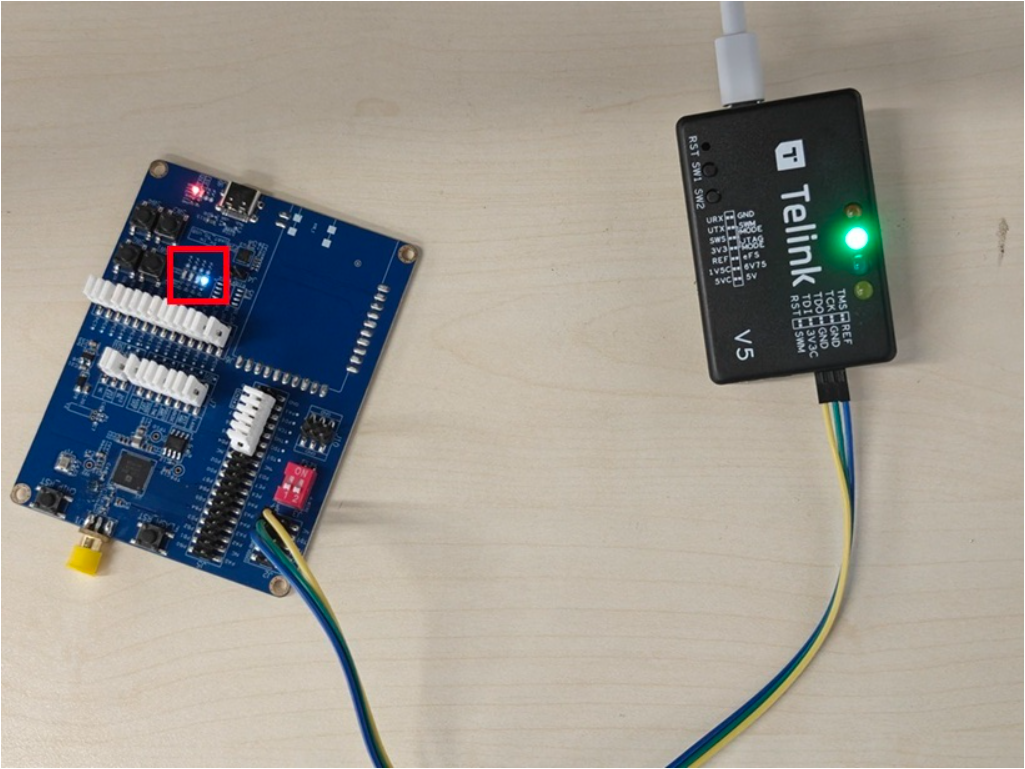
After flashing is complete, the development board will automatically reset; if it does not reset automatically, press the Reset button on the development board.
After the reset, observe the status of the onboard LED on the development board. If the LED blinks at regular intervals, the firmware has started and is running correctly.
Related documentation and resources
Documentation
| Document | Description |
|---|---|
| Telink Matter Developer Guide | Software architecture, repository structure, and functional module description of the tl_matter SDK |
| Telink Zephyr SDK Getting Started | Environment setup, build, and flashing instructions for the tl_zephyr SDK |
Community and resources
| Resource | Description |
|---|---|
| Telink Official Forum | Technical exchange and support |
| Telink Official Website | Product center and documentation center |
| Zephyr Project | Official Zephyr community |
| Matter Project | Official Matter community |
| GitHub | SDK source repository |
Appendix 1: FAQ
west build error: target board not found
Cause: The branch in use may not contain the board definition for the target development board. Telink development boards are available only in the corresponding branch of the Telink fork repository.
Solution:
1. Check the Updates/Dependencies section of the Release Notes to identify the tl_matter SDK branch you plan to use and its matching tl_zephyr SDK branch.
2. Check the current tl_zephyr SDK branch:
cd ~/zephyrproject/zephyr
git remote -v # should include telink-semi/tl_zephyr
git branch --show-current
If the current branch is incorrect, switch to the matching branch:
git checkout <matched-branch-or-commit> # switch if needed
west update
After switching to the tl_zephyr SDK branch, refer to the Fetch the Telink HAL section in Telink Zephyr SDK Getting Started to fetch the HAL file again.
3. Check the current tl_matter SDK branch:
cd ~/zephyrproject/connectedhomeip
git branch --show-current
If the current branch is incorrect, switch to the matching branch and reconfigure the Matter development environment:
git checkout <matched-branch-or-commit> # switch if needed
./scripts/checkout_submodules.py --platform telink linux
rm -rf .environment
source scripts/bootstrap.sh
source scripts/activate.sh
4. After completing the checks and configuration above, run the build command again:
cd examples/lighting-app/telink
west build -b <your_board>
Appendix 2: TL3238X build configurations
The TL3238X supports multiple build configurations depending on the Flash size and whether Matter + Zigbee dual-mode support is required. The main configuration combinations are as follows:
| Configuration | Flash | OTA | LZMA | Matter + Zigbee | Configuration file |
|---|---|---|---|---|---|
| Default | 2 MB | No | No | No | boards/tl3238x.conf |
| OTA + BT DFU + LZMA | 2 MB | Yes | Yes | No | boards/tl3238x_2m_flash_ota_lzma.conf |
| Dual-mode + OTA | 4 MB | Yes | No | Yes | boards/tl3238x_4m_flash_dual_mode_ota.conf |
Note
- For the 2 MB Flash + OTA configuration, LZMA compression must be enabled; otherwise, the firmware does not fit in the available Flash space.
Example: 2 MB Flash with OTA + LZMA (software version 2)
west build -p -b tl3238x -d build_tl3238x_lzma_v2 -- \
  -DCONF_FILE="prj.conf boards/tl3238x_2m_flash_ota_lzma.conf" \
  -DCONFIG_CHIP_DEVICE_SOFTWARE_VERSION=2
If the development board uses a Flash size other than the default 2 MB, specify the Flash size at build time. For example, to specify 4 MB:
west build -b tl3238x -- -DFLASH_SIZE=4m
For detailed build configurations and build commands for the TL3238X and other development boards, see Appendix 3: Build instructions for each development board.
Appendix 3: Build instructions for each development board
Each development board has a corresponding *_README.md file in the examples/<app>/telink/boards/ directory. These files contain detailed build commands for each build configuration of the board, including the default configuration, OTA + LZMA, Matter + Zigbee dual-mode, 4 MB Flash, and the software version 2 configuration for DFU/OTA images.
Lighting App
- TL3238X: tl3238x_README.md
- TL5218X: tl5218x_README.md
- TL7218X: tl7218x_README.md
Light Switch App
- TL3238X Retention: tl3238x_retention_README.md
- TL5218X Retention: tl5218x_retention_README.md
- TL7218X Retention: tl7218x_retention_README.md